 blog
Fitbit vs Apple Health Tracking: Accuracy & Features
Table of Contents
- Fitbit vs Apple Health Tracking: What Sets Them Apart
- Step Count and Activity Tracking Accuracy
- Apple Watch vs Fitbit Sleep Tracking Performance
- Fitbit vs Apple Watch Accuracy: Heart Rate and Health Metrics
- Fitbit GPS Tracking and Workout Recording
- Fitbit Premium Subscription: Features and Value
- Choosing Between Fitbit and Apple Watch for Your Health Goals
- Frequently Asked Questions
Last Updated: October 19, 2026
Fitbit vs Apple Health Tracking: What Sets Them Apart
When you're choosing between Fitbit and Apple health tracking, you're really comparing two fundamentally different philosophies. One is built around dedicated fitness focus. The other integrates health tracking into a broader ecosystem. Both collect similar data, steps, heart rate, sleep, but how they measure it, display it, and connect to your life differs significantly.
Fitbit vs Apple health tracking matters because accuracy affects your decisions. If your step count is off by 20%, you might think you're hitting your goals when you're not. If sleep data misses REM cycles, you lose insight into recovery quality. The differences between these platforms go deeper than brand loyalty.
At eeMeds, we understand that wearable data is only useful when it connects to meaningful health insights. Whether you choose Fitbit or Apple Watch, what matters most is how that data integrates into your broader wellness picture, not just the device itself.
Step Count and Activity Tracking Accuracy
Step counting sounds simple, but precision varies. Fitbit devices use a three-axis accelerometer to detect motion. Apple Watch uses similar technology plus motion coprocessors that filter out false positives, like arm movements while sitting at a desk.
In practice, both devices perform well on flat surfaces and steady walking. Where they diverge is on inclines, varied terrain, and activities that don't look like traditional steps. Fitbit tends to count more aggressively on irregular movement patterns. Apple Watch is more conservative, sometimes missing arm-based activity entirely.
A key difference: Fitbit syncs step data continuously throughout the day. Apple Watch batches updates, which means real-time accuracy tracking feels different on each platform. If you're checking your progress hourly, you'll notice the lag on Apple Watch. For daily totals, both converge by evening.
The practical takeaway: neither device is perfectly accurate. Both typically fall within 5-10% of actual step counts during normal walking. The real question is whether you need minute-by-minute precision or just daily totals. Most users find the difference negligible for weekly and monthly trends.
Apple Watch vs Fitbit Sleep Tracking Performance
Sleep tracking has become a major selling point for both platforms, but they measure different things. Fitbit estimates sleep stages using heart-rate variability and movement patterns. Apple Watch uses similar sensors but adds a newer approach: on-device processing that detects when you're actually asleep versus just lying still.
Fitbit provides more granular sleep-stage data. You see deep sleep, light sleep, REM, and awake periods. This appeals to users who want detailed breakdown. Apple Watch simplified its approach, you get total sleep time and quality score, with optional sleep focus modes that help you wind down.
The accuracy question is tricky. Sleep-stage estimation from wearables is notoriously difficult to validate without lab equipment. Both Fitbit and Apple Watch use algorithms trained on limited datasets. Neither is medical-grade. If you're managing sleep disorders, wearable data is useful context, not diagnosis.
One practical advantage of Fitbit: sleep data exports easily for sharing with healthcare providers. Apple Watch keeps data locked in the Health app, which complicates integration with external systems. If you're tracking sleep for medical reasons, this matters.
Fitbit vs Apple Watch Accuracy: Heart Rate and Health Metrics
Heart-rate tracking is where these devices truly diverge. Apple Watch uses a four-LED optical heart-rate sensor that's been refined over multiple generations. Fitbit uses similar optical sensors but with different calibration approaches.
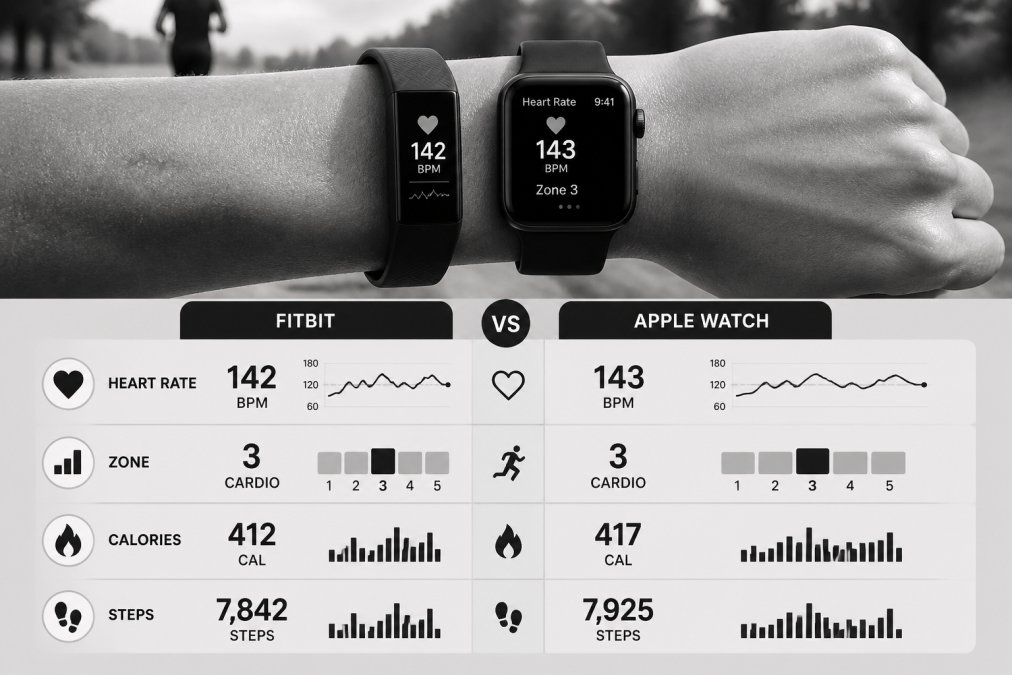
For resting heart rate, both are reliable. The difference shows up during intense exercise. Apple Watch tends to track faster heart-rate changes more accurately. Fitbit sometimes lags during rapid intensity shifts, like sprinting after steady jogging.
Beyond heart rate, Apple Watch measures blood oxygen and can detect irregular heart rhythms. Fitbit offers SpO2 tracking on premium models but doesn't detect arrhythmias. If you have cardiac concerns, Apple Watch provides more clinical-grade features.
Stress tracking differs too. Fitbit estimates stress using heart-rate variability. Apple Watch uses similar metrics but frames them as "mindfulness" minutes and recovery time. The underlying science is similar, but Apple's framing feels less medical, more wellness-oriented.
For general fitness tracking, both devices are accurate enough. The gap widens only if you're using wearables for medical monitoring or high-performance training.
Fitbit GPS Tracking and Workout Recording
GPS accuracy matters for runners, cyclists, and hikers, and this is one area where the two platforms differ in ways that affect daily use rather than just spec sheets.
A correction worth stating plainly: Apple Watch has built-in GPS on every model, including GPS-only versions. You do not need your phone nearby to record an outdoor route, and you do not need a cellular model. Fitbit also includes built-in GPS on most current models, though some entry-level trackers rely on connected GPS from your phone.
In practice, both platforms record route distance within a few meters per mile on open terrain. The divergence appears in dense urban areas and under tree cover, where multi-band GPS on higher-end Apple Watch models tends to hold a lock more consistently.
Workout recording is where the platforms feel most different:
- Auto-recognition. Fitbit recognizes common activities automatically, including walking, running, cycling, swimming, and elliptical. Apple Watch also prompts you to start a workout when it detects activity, but the prompt is easy to miss if you are not looking at your wrist.
- Workout modes. Apple Watch offers a broader catalog of activity types, including pilates, HIIT, dance, rowing, and martial arts, each with tailored metrics. Fitbit covers the major categories well but has fewer niche modes.
- In-workout screens. Apple Watch lets you customize metrics per workout type and add segments, splits, and pace alerts. Fitbit shows fewer live metrics during a workout but summarizes well afterward.
- Swim tracking. Both platforms handle pool and open-water swimming, but Apple Watch's water-ejection and stroke-type detection are more detailed.
A practical difference that rarely appears in comparisons: data exportability. Fitbit allows you to export your account data as a CSV or through its API, which makes it easier to move workout history into a spreadsheet, a training log, or a third-party app.
For casual fitness, both platforms record workouts accurately enough. For runners and multi-sport athletes who care about route precision, niche workout modes, and long-term data portability, the differences are worth weighing before purchase.
Fitbit Premium Subscription: Features and Value
Fitbit Premium is a paid subscription tier that unlocks deeper analytics, personalized insights, and guided programs. It is optional, and basic step, heart-rate, sleep, and workout tracking work without it. Apple does not charge a subscription for core health tracking on Apple Watch, but it does sell Apple Fitness+ separately, and some third-party health apps charge their own subscriptions.
What Fitbit Premium adds, concretely:
- Deeper sleep analysis. A monthly sleep profile, sleep-stage breakdowns over time, and a sleep score with contributing factors.
- Guided programs. Structured multi-week plans for activity, sleep, stress management, and weight goals.
- Advanced insights. Trend breakdowns and personalized recommendations that go beyond the free dashboard.
- Wellness reports. A shareable summary you can bring to a healthcare appointment.
- Ad-free app experience and priority support.
Apple's equivalent depth comes from a mix of the Health app, the Mindfulness app, and third-party apps. The Health app shows trends and highlights, and you can share health data with a clinician through the sharing feature, but it does not bundle guided programs the way Premium does. Apple Fitness+ is a separate subscription focused on workouts, not health analytics.
Here is the comparison that most articles skip: total cost of ownership over time.
| Cost factor | Fitbit path | Apple Watch path |
|---|---|---|
| Device price | Lower entry point on trackers | Higher entry point on watches |
| Subscription | Optional Premium tier | None for core tracking; Fitness+ optional |
| Replacement bands | Widely available, low cost | Widely available, varies by band |
| Charging accessories | Included; extra chargers cheap | Included; extra chargers vary |
| Feature cost over 3 years | Device plus optional Premium | Device plus optional Fitness+ |
The decision is not just "subscription versus no subscription." It is whether the features you actually use justify a recurring cost. If you mainly track steps and sleep, the free tier on either platform is sufficient. If you want guided programs, a monthly sleep profile, and shareable wellness reports, Premium is the more direct path.
A final ownership consideration: data portability. Fitbit lets you export account data, which matters if you later switch platforms or want to keep a long-term record. Apple Health data can be exported as an XML archive, but it is not designed for casual analysis. Whichever path you choose, confirm you can get your history out before you need to.
Choosing Between Fitbit and Apple Watch for Your Health Goals
Your choice depends on what you actually use. If you're deeply invested in Apple's ecosystem, iPhone, iPad, Mac, Apple Watch integrates seamlessly. Your health data flows into the Health app alongside medications, medical records, and lab results.
If you value fitness specificity and detailed analytics, Fitbit delivers more granular data. Sleep-stage breakdowns, stress tracking, and personalized programs appeal to users focused on fitness optimization.
Device compatibility is crucial. Apple Watch requires an iPhone. Fitbit works with both iOS and Android. If you switch phones frequently or use different devices across your household, Fitbit offers more flexibility.
Cost matters. Entry-level Fitbit trackers cost less than Apple Watch. Premium Apple Watch models cost significantly more. If budget is tight, Fitbit offers better value for basic health tracking.
One consideration: long-term data integration. This is where platforms like eeMeds become valuable, they unify wearable data from both Fitbit and Apple Watch, connect it to lab results and medications, and provide AI-powered insights that help you understand the whole picture.
Neither Fitbit nor Apple Watch alone gives you complete health context. They're data collection devices. The real value emerges when that data connects to your medical history, your goals, and professional guidance.
Both Fitbit and Apple health tracking deliver solid data collection, but they serve different needs. Fitbit excels at detailed fitness analytics and works across device ecosystems.
Frequently Asked Questions
Which fitness tracker is more accurate for step counting, Fitbit or Apple Watch?
Both Fitbit and Apple Watch use accelerometers to count steps, but accuracy varies by model and individual movement patterns. Fitbit devices are known for consistent step-count performance across most activities. Apple Watch integrates motion data with arm movement recognition. For controlled testing, wear both devices simultaneously during a known distance walk to compare their readings. Individual results depend on how you move and which specific models you're comparing, so testing with your own activity patterns gives the most reliable comparison.
Does Fitbit have GPS tracking, and how does it compare to Apple Watch?
Many Fitbit models include built-in GPS for accurate distance and route tracking during outdoor workouts. Apple Watch also offers GPS on most models. The key difference: Fitbit GPS tracks your route precisely for running and cycling, while Apple Watch combines GPS with other sensors for a broader fitness picture. For runners and cyclists who need detailed route mapping, Fitbit GPS tracking is straightforward. Both devices sync GPS data to their companion apps, though the data formats and export options differ.
Is Fitbit Premium subscription worth the cost?
Fitbit Premium adds advanced features like detailed sleep-stage analysis, personalized insights, and workout challenges. Whether it's worth the cost depends on your priorities: if you want deeper sleep data and guided wellness programs, it adds value. If you only track basic activity, the free version may be sufficient. Consider your current use of Fitbit's free features and whether the additional analytics would actually change your health decisions before committing to a subscription.
How does Apple Watch sleep tracking compare to Fitbit for accuracy?
Apple Watch and Fitbit both estimate sleep stages (light, deep, REM) and total sleep duration using accelerometer and heart-rate data. Fitbit is often praised for detailed sleep-stage breakdowns and consistency. Apple Watch provides sleep tracking but with less granular stage data in its standard app. For the most detailed sleep insights, Fitbit and Fitbit Premium users get more comprehensive analysis. However, both devices estimate rather than measure sleep stages, they cannot provide medical-grade accuracy and should not replace clinical sleep studies for diagnosis.